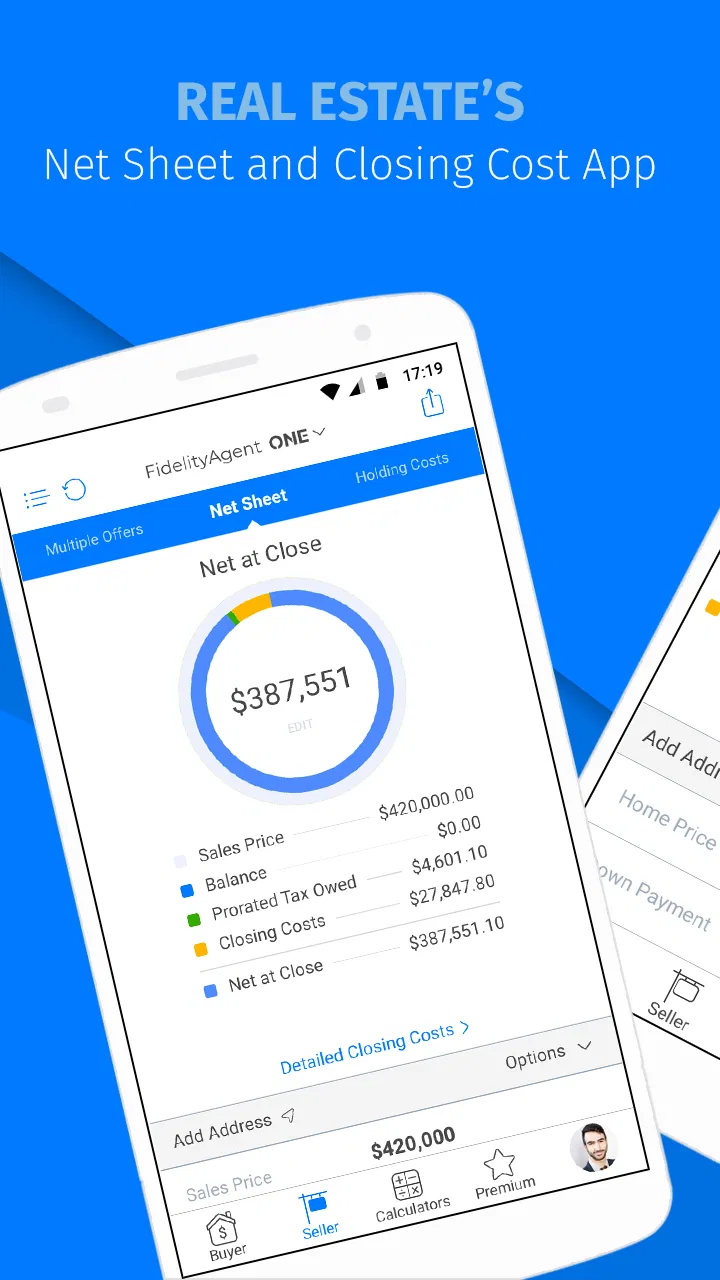
FidelityAgent ONE
- 4.2
- Rating
- 50.00K
- Installs
- Free
- Price

 Analysis by App-foxy
Real estate work rarely happens at a desk from beginning to end. I may be moving between appointments, answering a client, checking a property detail, and trying to keep the next task from slipping through the cracks. That is the setting where FidelityAgent ONE makes the most sense. It is a free finance app from PalmAgent aimed specifically at real estate professionals, and its value is less about replacing every tool in an agent’s workflow than about putting a focused professional utility within reach when the day becomes mobile.
I approached it as an app for someone who needs a practical companion during property-related work rather than as a general personal-finance application. That distinction matters. A homebuyer looking for a budgeting app, a tenant comparing monthly costs, or someone seeking a complete property-management platform may find the focus too narrow. For an agent who wants a dedicated mobile option connected to the FidelityAgent name, however, the idea is immediately more relevant.
Why a dedicated real estate tool can matter
The central capability here is specialization. Instead of presenting itself as a broad banking dashboard or a generic calculator, FidelityAgent ONE is built around the needs of real estate professionals. In practice, that changes what I expect from it: I look for speed during client conversations, information that is easy to reach while away from a computer, and a workflow that does not force an agent to improvise with unrelated finance apps.
You May Also Like

 Blood Strike: 2.5 Anniversary
Blood Strike’s Loadouts Turn Every Drop Into a Tactical Gamble
A close look at Blood Strike’s custom loadouts: how fast access to signature weapons reshapes its battle royale rhythm, rewards preparation, and narrows the gap between fights.

 Pandora - Music & Podcasts
Pandora’s Music Is Easy to Start, but Harder to Recover
Pandora’s strength is its low-effort path from a seed to a station. Its weak spot is how much confidence it asks you to place in connection, setup, and quiet recovery.

 8 Ball Pool
 Is Built on Rivalries, Rematches, and Routine
A close look at the rivalries, rematches, shared routines, and unanswered safety questions that turn a quick pool match into a persistent mobile community.

 Samsung Music
’s Quiet Strength Is Playing What You Already Own
Its reach comes less from spectacle than from dependable access to a personal library. That simplicity is both the app’s strongest retention engine and its ceiling.

 AccuWeather: Weather Radar
AccuWeather Review: A Quick, Clear Forecast for Everyday Decisions
For everyday plans, the best forecast is the one you can understand quickly. AccuWeather makes rain timing, radar, and local conditions easy to act on, with a few trade-offs.

 Hill Climb Racing
Why Hill Climb Racing Still Turns Crashes Into One More Run
A tiny car, a bumpy hill and one more upgrade: Hill Climb Racing keeps resurfacing because its simple chaos makes every near-miss feel personal.
More From Our News Desk
View All News


That focus can be useful because real estate decisions often combine property information, financial thinking, and communication. A general finance app may handle personal spending beautifully but still feel out of place when I am discussing a listing, preparing for a showing, or helping a client think through a purchase. A general notes app can store reminders, but it does not feel designed around the rhythm of professional property work. FidelityAgent ONE occupies that narrower space.
Its store presence places it in the finance category, but I would not judge it by the same standard as a full-service banking app. The relevant question is whether it helps an agent keep professional tasks moving while working away from a desktop. That makes the app’s context more important than a long list of consumer-finance functions.
The current release is version 4.8.5.1.5, and the app supports Android 7.0 and later. That broad operating-system reach is useful for professionals who keep an older work phone or do not replace devices frequently. It also means the app is not restricted to people carrying the newest hardware, although the experience will naturally depend on the phone itself and its general condition.
What the focused design changes during a busy day
When an app is designed for a profession, the benefit is often a reduction in context switching. I do not have to begin with a blank spreadsheet, decide which consumer finance tool is close enough, or translate a generic interface into real estate language. A dedicated app gives the work a more obvious home.
That sounds modest, but it affects small moments. An agent may be standing outside a property before a viewing, speaking with a buyer in a car, or moving between offices. In those situations, the best tool is not necessarily the one with the largest feature list. It is the one that can be opened with a clear purpose and used without turning a short task into an administrative session.
There is also a professional-confidence benefit. Using a tool made for the field can make it easier to keep property-related activity separate from personal banking, private notes, and unrelated household finances. I would still treat the phone as a work device that needs sensible protection, but the dedicated context helps keep the workflow mentally organized.
How I would use it in practice
I would begin by treating FidelityAgent ONE as a work companion, not as the only application on my phone. Before an appointment, I would use it as part of a short preparation routine: review the information I need for the conversation, identify the financial points that may require attention, and keep the app available while moving through the meeting. The advantage is the continuity between preparation and the client-facing moment.
A realistic example is an agent heading to a property showing with a buyer who has questions about affordability. The agent may not need a full financial planning session at that exact moment. What matters is being able to consult a professional resource without returning to the office or opening several unrelated tools. FidelityAgent ONE is most convincing in that kind of brief, time-sensitive interaction, where a focused mobile workflow is more useful than a large desktop system.
After the meeting, I would use the same process in reverse. Rather than relying on memory, I would make the app part of a follow-up habit: revisit the relevant work, confirm what needs attention, and then move the next action into the broader system the agency already uses. This is one of the less obvious trade-offs of a focused app. It can improve the moment-to-moment experience while still requiring another system for the complete record.
That means agents should decide in advance what role the app has. If it is used as a quick professional reference or mobile task companion, it can remain manageable. If I expect it to replace my customer relationship system, accounting software, document storage, calendar, and communication tools all at once, disappointment is likely. A narrow tool becomes more useful when its boundaries are clear.
A practical workflow for appointments
My preferred workflow would be simple. Before leaving for a showing, I would open the app while I still have a stable connection and make sure I understand the information I expect to use. During the appointment, I would avoid trying to perform a complete administrative cleanup. I would use the app for the immediate professional need, stay engaged with the client, and record only what belongs in that moment.
Once the appointment ends, I would set aside a short follow-up period to transfer any lasting notes or decisions into the agency’s main records. This two-stage approach prevents a mobile finance tool from becoming a second, incomplete database. It also reduces the risk of forgetting which information was left in the app and which information was entered elsewhere.
A useful tip is to separate preparation from improvisation. If I already know a client is likely to ask about costs or purchase readiness, I would prepare before arriving instead of hoping to navigate everything while standing in a hallway. The app’s value is strongest when it shortens a known task, not when it is used as a substitute for planning.
Another practical insight is to keep client conversations human. A phone screen can support a discussion, but it should not dominate it. I would use FidelityAgent ONE to clarify a point, then put the phone down and explain the result in ordinary language. That is especially important in real estate, where a technically correct figure or detail may still need context before a client can make a sensible decision.
Where it fits beside familiar alternatives
The usual alternatives fall into several groups. A general finance app is better for personal budgets, bank activity, and household money. A spreadsheet is more flexible when an agent wants to design a custom calculation or maintain a detailed private model. A customer relationship platform is stronger for contacts, follow-ups, and the long history of a client relationship. Desktop real estate software may offer deeper administration and a wider view of office operations.
FidelityAgent ONE is not automatically better than those options. Its advantage is the professional real estate context and the possibility of handling a focused task from a mobile device. If I need a flexible model with unusual formulas, I would choose a spreadsheet. If I need a complete pipeline of leads and reminders, I would choose a dedicated CRM. If I am managing personal spending, a consumer finance app is the more natural fit.
The important comparison is therefore not “which app has the most features?” but “which tool creates the least friction for this particular task?” For a real estate professional who repeatedly needs a mobile, field-oriented finance utility, FidelityAgent ONE has a clearer reason to exist than a generic alternative. For everyone else, the specialization may feel like an unnecessary extra layer.
The strongest scenario: working between properties
The best scenario is an agent who spends much of the day away from a desk and needs a consistent professional tool during property visits. Imagine a morning with several appointments, a client who changes priorities halfway through the day, and short gaps between locations. In that environment, the agent cannot afford to rebuild the same context every time a financial question appears.
FidelityAgent ONE can serve as an anchor in that schedule. I would use it before the first appointment to get oriented, during the day to support relevant conversations, and afterward to identify what should be carried into the office system. The benefit is not dramatic automation; it is the removal of small interruptions that otherwise accumulate across a busy day.
This scenario also shows why the app may appeal more to independent agents and mobile teams than to people whose work is almost entirely administrative. A field agent feels the cost of switching between tools immediately. Someone who spends most of the day inside a desktop platform may gain less from having the same kind of resource on a phone.
There is a second strong use case: a newer professional building a repeatable routine. An experienced agent may already have a carefully tuned collection of spreadsheets, templates, and office systems. Someone earlier in the process may appreciate a purpose-built starting point because it gives the work a clearer structure than a collection of unrelated apps. I would still encourage that user to learn the underlying financial concepts rather than treating the app as an authority that removes the need for judgment.
What I would check before relying on it
Before making it central to my work, I would test it during a low-pressure appointment rather than during a critical client meeting. I would check how quickly I can reach the functions I actually need, whether the text is comfortable to read on my phone, and whether moving between preparation and follow-up feels natural. These are not glamorous tests, but they reveal whether the app fits a real schedule.
I would also establish a backup habit. Important client information should not live in only one mobile application, especially when an agent already has an office database or document system. FidelityAgent ONE may be useful in the field, but a professional record should remain organized in the place the team uses for long-term continuity.
People often ask whether a free app can be used without paying. The listed price is free, while optional in-app purchases range from $0.99 to $9.99 per item. I would install it and explore the basic workflow before spending anything, then decide whether an optional purchase solves a real problem in my routine rather than adding features simply because they are available.
The age rating is Everyone, which makes the app broadly accessible from a content-rating perspective. That should not be confused with suitability for every user. The app’s professional purpose still makes it most appropriate for people involved in real estate work, not for children or casual users searching for a household budgeting tool.
Trade-offs that become visible with regular use
The first trade-off is specialization versus breadth. A focused real estate app can feel easier to understand than a huge business platform, but it may not cover every surrounding task. I would expect to keep other tools for communication, scheduling, documents, and record management. That is not necessarily a flaw; it is simply the cost of choosing a focused instrument.
The second is mobile convenience versus screen space. A phone is excellent for quick checks and short interactions, but it is less comfortable for reviewing a large amount of information or comparing several details at once. If I am preparing a complex client presentation, I would rather use a larger screen. If I am between appointments and need a focused action, the phone is the better setting.
The third is workflow discipline. A dedicated app can make work feel more organized, but only if I decide where information belongs. Without that decision, it is easy to create duplicated notes: one in the app, one in a CRM, and another in a message to myself. The app can reduce friction at the point of work while increasing cleanup later if I use it without a follow-up system.
There is also a learning curve, even for a focused product. Real estate professionals bring different habits and office processes, so an interface that feels obvious to one agent may not match another person’s routine. I would give it a few real working sessions before judging it, but I would not force it into a team workflow if it consistently creates duplicate entry or slows down client service.
Its adoption figures suggest a real but specialized audience: it has passed fifty thousand installs, with an average rating of 4.2 from around three hundred ratings and 131 reviews. I read that as a sign of useful traction rather than proof that it will suit every agency. The audience is large enough to show that the concept has practical appeal, but the rating also leaves room for individual differences in expectations and workflow.
Who should choose it, and who should skip it
I would recommend trying FidelityAgent ONE if I were an agent who works from properties, meets clients outside the office, and wants a finance-oriented tool made with real estate work in mind. It is also worth considering for a professional who is tired of adapting a personal finance app to business conversations and wants a more appropriate mobile starting point.
I would be more cautious if I already had a reliable enterprise platform that handles every relevant task in one place. Adding another app may create more maintenance than value. I would also skip it as a primary choice if my goal were personal budgeting, investment tracking, banking, or household expense management. Those needs call for tools designed around the individual rather than the real estate profession.
Teams should think about consistency before deployment. If every agent uses the app differently and nobody agrees on what gets transferred into the main office system, the result may be fragmented information. A small team can avoid that by defining one simple rule: use the mobile app for immediate work, then place lasting client or transaction information in the team’s official record.
My final view after assessing the fit
FidelityAgent ONE makes the most sense when I judge it as a specialized mobile companion for real estate professionals rather than as a universal finance solution. Its strongest quality is the way a dedicated professional context can support agents during the parts of the day that happen away from a desk. The app is most valuable when it helps me handle a focused task quickly and then return my attention to the client or property.
I would not install it expecting one application to replace my entire business setup. I would pair it with the agency’s established tools, create a clear follow-up routine, and test it in ordinary appointments before depending on it for important conversations. That approach respects both its usefulness and its limits.
PalmAgent has kept the app available across a wide range of Android devices, and the free entry point makes experimentation straightforward. Optional purchases mean I would still review the available choices carefully, but I would begin with the basic experience and judge it by time saved, clarity during appointments, and how cleanly it fits into my records.
My recommendation is therefore specific: choose it when your real estate work is mobile and your main need is a focused professional finance companion. If that describes your day, the app has a sensible role and may remove several small sources of friction. If your needs are personal finance, deep analysis, or complete business administration, a different category of tool will serve you better.
FAQs for FidelityAgent ONE
01What is FidelityAgent ONE and who is it designed for?
FidelityAgent ONE is a mobile-focused platform intended for real estate professionals who need access to Fidelity National Title Group resources while working away from the office. It may help agents and related users review transaction information, access title and escrow resources, and stay connected with services. Availability and features can vary by account type, region, and participating Fidelity company.
02Do I need a Fidelity account or professional credentials to use FidelityAgent ONE?
Yes, users should generally expect to need an eligible Fidelity-related account, login credentials, or an invitation from a participating title or escrow office. This is not typically an open consumer app that can be used fully without registration. Before downloading, confirm that your local Fidelity representative supports the application and can provide the correct access details for your role.
03What can I do with FidelityAgent ONE after signing in?
The exact tools depend on your organization and permissions, but the app is designed to provide convenient access to real estate transaction-related information and Fidelity services. Depending on your account, you may be able to view orders or transaction details, communicate with contacts, access documents or resources, and monitor updates. Some functions may redirect you to web-based services rather than operate entirely inside the app.
04Is FidelityAgent ONE safe for handling real estate transaction information?
Because the app can involve sensitive business and transaction data, users should treat security as a priority. Use only the official Android or iOS download source, protect your account with a strong password, and avoid signing in on shared or unsecured devices. The app’s security controls and privacy practices may change, so review the current store listing and Fidelity’s privacy information before using it.
05Why might some features or services be unavailable in my area?
FidelityAgent ONE is connected to Fidelity National Title Group services, which can differ according to state, market, office, underwriting company, and user permissions. As a result, two users may see different tools or transaction options. If a feature is missing, an order cannot be located, or registration fails, contact your Fidelity title or escrow representative rather than assuming the app is malfunctioning.
Pros
- Centralizes portfolio
- cash
- and account information in one app.
- Provides market data and investment research for informed decisions.
- Supports secure access with Fidelity’s established financial infrastructure.
- Useful tools help track performance and monitor investment goals.
- Available for both Android and iOS users.
Cons
- Some advanced features may be difficult for first-time investors.
- Market data and account balances can occasionally update with delays.
- Requires a Fidelity account
- limiting its usefulness for other brokers.
- Frequent notifications may feel excessive unless carefully customized.
- Investment information does not replace personalized financial advice.

FidelityAgent ONE
Gallery